

Thinking about the price of a virtual receptionist can feel a bit like sizing up a new mobile phone plan. The final bill depends entirely on what you actually need—your usage, the features you pick, and the level of service you’re after. You could be looking at anything from under $100 a month for a simple setup to over $1,000 for a full-blown, 24/7 operation.
Decoding Virtual Receptionist Price Tiers
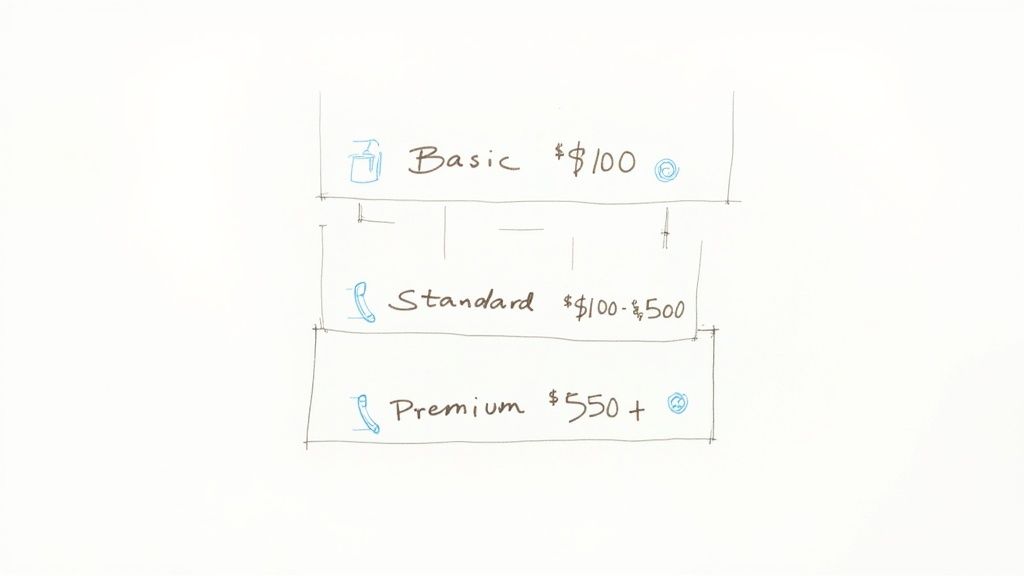
To get your bearings, it helps to understand the typical pricing tiers. You wouldn’t shop for a car without knowing the difference between a compact and an SUV, right? It’s the same idea here. Grasping the common service levels helps you see what’s out there and where your business might fit.
Most providers package their services into three main categories. Let’s walk through what these tiers usually look like so you can start to see a path for your own business.
Common Service Levels
In 2026, you’ll see virtual receptionist services running anywhere from $95 to $1,200 per month. It’s a wide spread, but it breaks down pretty logically.
Basic plans typically land between $95 to $250 a month, giving you about 50-150 minutes of service. This is often the sweet spot for solopreneurs or businesses with a very light call load. Mid-tier plans for growing businesses usually sit in the $250-$500 range, while premium services with things like 24/7 coverage can push costs to $500-$1,200 or even higher. It all comes down to what you’re really paying for.
Here’s a piece of hard-won advice: the “cheapest” plan isn’t always the most cost-effective. If your call volume is unpredictable, a low-minute plan with punishing overage fees can easily end up costing you more than a higher-tiered plan with more breathing room.
This table gives you a quick snapshot of what to expect at each level. Use it as a benchmark when you’re looking at quotes to make sense of the value behind the virtual receptionist price tag. For a closer look at how these costs stack up, check out our guide on the cost of an answering service.
Typical Virtual Receptionist Price Tiers
Here’s a quick summary to help you match your business needs with the right service level.
| Service Tier | Typical Monthly Price | Common Inclusions | Best For |
|---|---|---|---|
| Basic (Entry-Level) | $95 – $250 | 50-150 minutes, message taking, call forwarding. | Solopreneurs and businesses with very low call volume. |
| Standard (Growth) | $250 – $500 | 150-300 minutes, appointment scheduling, call routing. | Growing small businesses with consistent call traffic. |
| Premium (Enterprise) | $500 – $1,200+ | 300+ minutes, 24/7 coverage, CRM integrations, lead capture. | Established businesses or those needing round-the-clock support. |
This breakdown should give you a solid starting point for figuring out what kind of investment makes sense for your company’s stage and call volume.
Breaking Down the Pricing Models
To make a smart call on a virtual receptionist, you first need to get your head around how providers charge. It’s not just about the final number on the invoice; it’s about the structure behind that number.
Think of it like picking a mobile phone plan. What a world traveler needs is completely different from what someone who barely leaves their neighborhood needs.
Most services lean on one of three core pricing models. Each one is built for a different kind of business and call flow. The real trick is finding the one that lines up with how your phones actually ring, not just the one that looks cheapest on paper.
The Pay-As-You-Go Approach
The per-minute billing model is the classic pay-for-what-you-use option. You’re only on the hook for the actual time a receptionist is actively talking on your behalf. This is a fantastic choice if your call volume is all over the place or seasonal. Think of a tax preparer who’s swamped from January to April but dead quiet the rest of the year.
But here’s the detail that can bite you: how they round the minutes. Some providers bill in precise six-second increments, which is fair. Others, however, round up to the nearest 30 or even 60 seconds. A 61-second call could end up costing you for two full minutes. That tiny difference can quietly inflate your bill by 30-40% over time.
The Flat-Fee Method
Next up is the per-call model. With this, you pay one fixed rate for every call they handle, no matter how long it goes on. This structure is perfect for businesses whose calls are usually short and to the point.
For instance, if most of your calls are simple things like taking a name and number or confirming an address, this model gives you incredible cost predictability. You won’t get dinged for a chatty customer, which makes budgeting a whole lot easier.
The right pricing model isn’t about finding the cheapest option on paper. It’s about choosing the structure that best matches your unique call patterns to avoid overage fees and maximize value.
The All-Inclusive Subscription
Finally, we have the monthly subscription model, which works just like your Netflix account. You pay a set fee each month for a block of minutes or a certain number of calls. This is the most popular approach and is tailor-made for businesses with steady, predictable call traffic.
These plans usually offer the best bang for your buck, since the effective per-minute or per-call rate inside the bundle is lower than what you’d pay on a pay-as-you-go basis. For a deeper look at how these models stack up, checking out different answering service pricing structures can give you some valuable perspective. This model also simplifies your budget and often throws in extra features like appointment scheduling or CRM integrations as you go up the ladder.
The Key Factors That Drive Your Final Price

Knowing the basic pricing models—per-minute, per-call, or subscription—is just the starting line. To really get a handle on what you’ll pay, you need to look at the specific service ingredients that make up your final quote.
Think of it like building a car online. The base model has a price, but the leather seats, sunroof, and premium sound system all add to the final sticker. It’s the same with a virtual receptionist.
The biggest factor, hands down, is your call volume. A small business juggling 50 calls a month is in a completely different ballpark than a company handling 500. Providers build their plans around these thresholds, and going over your limit can mean getting hit with expensive overage fees.
Right behind volume is the scope of service you need. Are you just looking for someone to take a message? That’s one thing. But if you need them to book appointments directly into your calendar, process payments, or run through a detailed client intake form, you’re talking about a more complex—and therefore more expensive—service.
Availability and Complexity
Do you need someone answering the phone just during business hours, or is your business an around-the-clock operation? Having 24/7 and holiday availability is a premium feature, and you can expect it to bump up your monthly bill by 30% to 75%. It’s a serious investment, but it also means you never miss a lead, no matter when they decide to call.
The complexity of your call-handling instructions also plays a huge role. A simple script is one thing, but if you have complex routing rules—like sending calls to different people based on the caller’s problem—that requires a more sophisticated setup. That extra work and management will be reflected in the price.
The global virtual receptionist market was valued at $3.85 billion in 2024 and is on track to hit $9 billion by 2033, largely because of its flexible pricing. Plans can start as low as $25-$75/month for basic AI and scale up to $3,000+ for enterprise needs, often with setup fees of $50-$200. You can find more on what contributes to virtual receptionist costs and market trends.
Add-Ons and Hidden Fees
Beyond the core services, a few other things can pad your final bill. It’s smart to ask about these potential costs upfront when you’re comparing providers:
- Setup Fees: This is a one-time charge for getting your account onboarded, which can run anywhere from $50 to $200.
- Software Integrations: Need to connect the service to your CRM or scheduling software? That might tack on an extra monthly fee.
- Outbound Calling: If you want receptionists to make calls for you, this is almost always treated as a separate, higher-priced service.
- Overage Charges: The per-minute rate for calls that push you past your plan’s limit can be way higher than your base rate. Be careful here.
These are all important pieces of your business’s financial puzzle. To get a better feel for how these service fees fit into your overall budget, it helps to understand how to calculate operating expenses for a complete picture.
Calculating the True Return on Your Investment
Looking at a virtual receptionist’s monthly fee is like judging a car by its paint color—it tells you nothing about the engine. The real story isn’t about what you spend; it’s about what you get back. When you shift your mindset from “cost” to “investment,” you start to see that a virtual receptionist isn’t an expense. It’s a tool for growth.
To really see this in action, let’s put it up against the traditional alternative: hiring someone to sit at a desk and answer the phone. The sticker shock isn’t the salary. It’s everything else that comes with it.
The True Cost of an In-House Employee
A full-time receptionist’s salary might land somewhere between $30,000-$45,000 a year. But the actual cost to your business quickly swells to $40,000-$50,000 once you tack on 20-30% for things like payroll taxes, health insurance, retirement plans, and training.
And that’s before you even think about the cost of a desk, a computer, office space, paid time off, and sick days. It all adds up, fast.
In fact, businesses that make the switch to a virtual receptionist in 2026 are projected to cut their overhead by 40% to 60%. For many, that’s an annual savings of anywhere from $9,000 to $39,000, sometimes even more.
By framing the decision as an investment in efficiency, you can see how redirecting funds from a single-task employee to a scalable service creates a compounding return through saved time, captured leads, and increased team focus.
Measuring the Gains Beyond Cost Savings
The real ROI of a virtual receptionist goes way beyond just the salary you’re not paying. The true value is in the opportunities you grab and the productivity you unlock.
- Increased Lead Capture: Every single missed call is a potential customer walking away. With 24/7 coverage, you make sure every lead gets a response, gets qualified, and gets on the calendar. That directly feeds your bottom line.
- Enhanced Team Productivity: Nothing shatters deep, focused work like a constantly ringing phone. When you offload those routine calls, you free up your team to concentrate on the high-value tasks that actually move the needle for your business. Output improves, and so does morale.
- Improved Client Satisfaction: An immediate, professional answer to a call builds trust from the very first hello. A huge part of the return is tied to a better client experience, and it’s well worth mastering customer experience management to fully appreciate just how valuable that is.
If you want to dive deeper into the numbers, our guide on how to calculate ROI gives you a clear framework you can apply to your own business.
Once you start adding up the value of captured leads, the hours your staff gets back, and the reduced overhead, the financial case for a virtual receptionist becomes impossible to ignore.
How to Choose the Right Plan for Your Business
Picking the right virtual receptionist plan is a bit like choosing the right tool for a job. You wouldn’t use a sledgehammer to hang a picture, right? In the same way, you don’t want a tiny plan for a business with high call volume. The real key is matching the service to how your business actually operates, not just chasing the lowest price tag.
First things first, get a crystal-clear picture of your call traffic. Just for one week, track every single call that comes through. Note the time of day, how long it lasted, and why they were calling. This simple audit gives you a solid data baseline, showing you exactly when your peak hours are and what your callers need most.
This visual really drives home the financial upside of a virtual service, stacking up the initial investment against long-term savings.
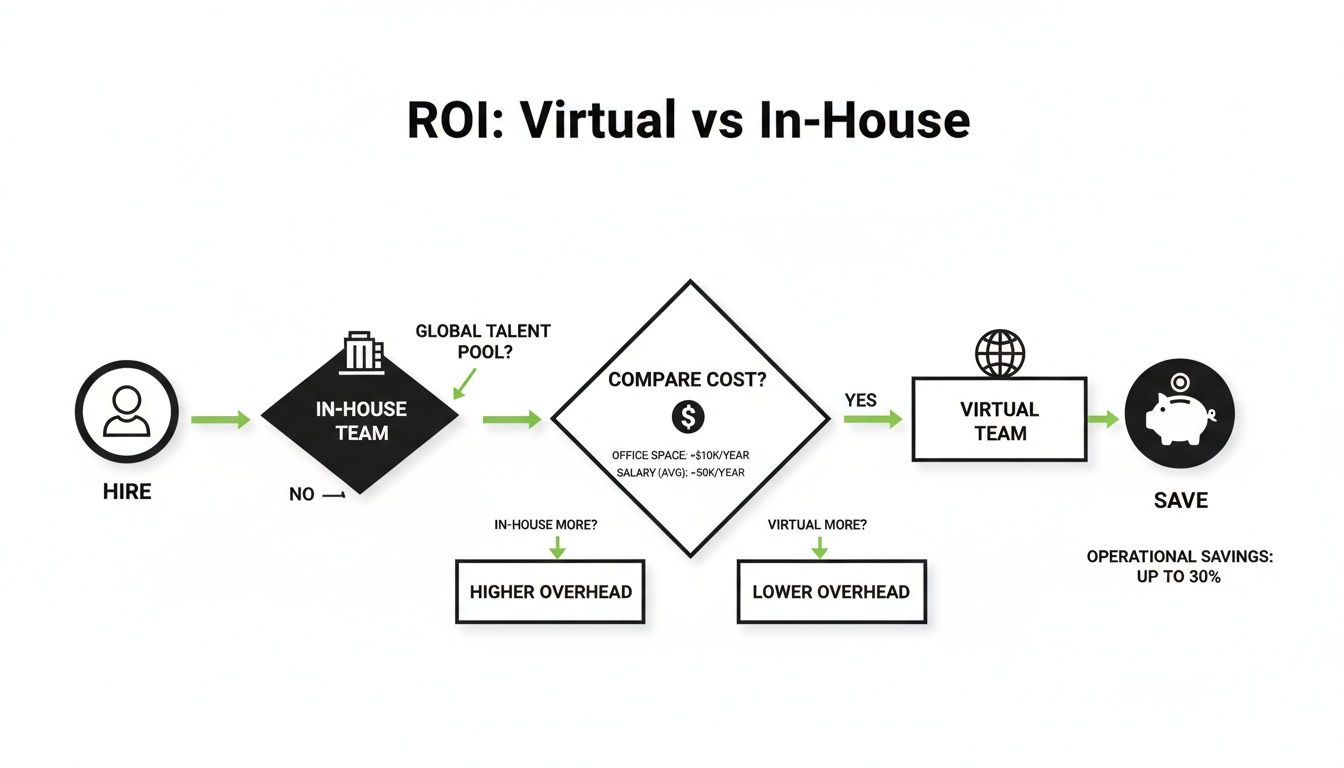
The numbers don’t lie. Going with a virtual receptionist slashes the overhead tied to an in-house hire, freeing up that capital to pour back into growing your business.
Analyze Your Business Needs
Once you have your call data in hand, it’s time to define what you actually need a receptionist to do. Are your needs pretty basic, or are you looking for more specialized skills? Getting clear on this stops you from overpaying for features you’ll never touch or, worse, picking a plan that can’t handle your real-world needs.
Think about which of these common tasks are on your list:
- Basic Message Taking: Just grabbing a name, number, and a quick reason for the call.
- Appointment Scheduling: Tying into your calendar to book, move, or cancel appointments.
- Lead Qualification: Asking a few smart questions to see if a caller is a hot new lead.
- Call Routing: Making sure calls get to the right person or department, without any hassle.
Your list of must-have tasks will point you toward the right kind of plan and provider. Some services are fantastic at simple answering, while others are built for complex, integrated workflows. For a deeper dive, our guide on the best answering services for small businesses is packed with useful insights.
Use a Checklist to Compare Vendors
With your needs clearly defined, you’re ready to start looking at providers. But don’t just take their marketing claims at face value. A structured, side-by-side comparison is the only way to make a decision based on what truly matters to your business.
A free trial is your best friend in this process. It’s the only way to truly get a feel for a service’s quality, professionalism, and ease of use before you commit. Pay close attention to how they handle your test calls.
To make this easier, use the checklist below as you vet potential partners. This methodical approach will help you cut through the noise and land on a service that delivers the best value and performance for your money.
Vendor Comparison Checklist
Use this checklist to evaluate and compare virtual receptionist providers to find the best fit for your needs.
| Feature/Question | Vendor A | Vendor B | Vendor C |
|---|---|---|---|
| Pricing Model (Per-Minute, Per-Call, Subscription) | |||
| Billing Increment (e.g., 6-sec, 30-sec, 60-sec) | |||
| Setup Fees | |||
| Overage Rate (Cost per minute/call over plan limit) | |||
| Free Trial Period Available? | |||
| Contract Flexibility (Month-to-month or annual) | |||
| Integrates with Your CRM/Calendar? | |||
| 24/7 Coverage Included or Add-on? |
Once you’ve filled this out for your top contenders, the right choice should become much clearer. It’s not about finding the cheapest option, but the one that offers the best return on every dollar spent.
Answering Your Top Pricing Questions
When you start digging into virtual receptionist pricing, things can get murky. You compare a few models, you look at the features, but some gray areas always seem to pop up and slow you down. Let’s clear the fog around the most common questions so you can move forward with total confidence.
Think of this as tackling those final “what if” scenarios head-on. By getting straight, clear answers, you can sidestep the usual traps and pick a service that actually fits your business like a glove.
Are There Hidden Fees I Should Watch Out For?
Yes, and you absolutely have to look beyond the advertised monthly rate. The sticker price rarely tells the whole story, and those sneaky extra fees can inflate your bill in a hurry if you’re not paying attention. It’s like buying a car—the base price is never what you actually drive off the lot for.
Before you sign anything, always insist on seeing a complete fee schedule. Keep a sharp eye out for these common culprits:
- Setup Fees: This is a one-time charge for getting your account up and running, usually somewhere between $50 and $200.
- Call Patching/Transferring: Some services will nickel-and-dime you every single time they connect a call to your personal line.
- Holiday or After-Hours Coverage: Expect to pay a premium for service outside of normal business hours. This can be anywhere from 1.5x to 2x the standard rate.
- Overage Charges: This is the big one. The moment you go over your plan’s allowance, the per-minute or per-call rate you pay is often way higher than your base rate.
Is a Per-Minute or Per-Call Plan Better?
This one has nothing to do with the size of your business and everything to do with the nature of your calls. A per-minute plan almost always makes more sense if your calls are longer, more involved conversations—think detailed client consultations or in-depth technical support.
On the flip side, a per-call plan is usually the smarter financial move if most of your calls are short and sweet. If you just need someone for quick message-taking or appointment confirmations, paying a flat fee per call gives you predictability and great value.
A quick tip: If your call volume is super low and unpredictable, a pure pay-as-you-go model might be your best bet. But if it’s consistent, a monthly subscription with a generous block of minutes or calls almost always offers the best bang for your buck.
How Much More Does a 24/7 Service Typically Cost?
Adding 24/7 coverage is definitely a premium feature, and the price will reflect that. You can generally expect to pay anywhere from 30% to 75% more for a round-the-clock service compared to a plan that only covers standard 9-to-5 business hours.
That price jump covers the provider’s higher costs for staffing receptionists overnight, on weekends, and during holidays. It’s a real investment, but it can be a game-changer for businesses that serve different time zones, offer emergency services, or are just dead set on capturing every single lead, no matter when it comes in.
Can I Try a Service Before Committing?
Absolutely—and you should insist on it. Any reputable provider will offer a free trial or a money-back guarantee, typically for 7 to 30 days. This is your chance to test-drive the service with zero financial risk.
Use this trial period to kick the tires on everything. How professional are the receptionists? How accurate are their messages? How well do they follow your call-handling instructions? A trial is the single best way to make sure a service’s performance actually lives up to its promises before you lock yourself into a contract.
Ready to see how an AI-powered assistant can transform your business communications while saving you money? Marlie Ai offers a smarter way to handle calls 24/7 for just a fraction of the cost of traditional services. Explore the future of call handling at https://www.marlie.ai and discover how you can capture every opportunity without breaking the bank.
