

When you hear “virtual receptionist for a medical practice,” what comes to mind? For many, it’s just a glorified answering service. But that’s selling the concept way short.
A modern virtual receptionist medical solution is a specialized service, often powered by AI, that acts as a true extension of your front office, handling patient communications 24/7. It’s designed to do much more than just take messages—it actively manages tasks like scheduling, routing calls, and answering patient questions so your practice never misses a beat.
The Modern Front Desk: An Intelligent Command Center
Think of your clinic’s front desk not as a single person behind a counter, but as an intelligent, around-the-clock command center. That’s the real shift here. We’re moving away from a linear, often bottlenecked process to a dynamic system built for how patients live and communicate today.
A traditional receptionist, through no fault of their own, operates like a single-lane road. During peak hours, it gets completely jammed. Calls pile up, leading to long hold times, missed appointments, and frustrated patients. When one call runs long, everyone else in the queue is stuck waiting, creating a poor experience before they even walk through your door.
A virtual receptionist medical service, on the other hand, is like a multi-lane highway. It can handle hundreds of interactions at the same time, effortlessly routing every patient call, text, and appointment request to the right place without a single delay. This isn’t just about answering the phone; it’s a sophisticated tool that manages the entire communication workflow. You can get a broader sense of how these systems work in our complete guide to what a virtual receptionist is.
A New Standard in Patient Communication
To see how far this has come, just look at advanced platforms like Marlie.ai. An AI-powered virtual receptionist can instantly:
- Schedule, confirm, or reschedule appointments right in your EMR’s calendar.
- Answer common questions about office hours, locations, or insurance plans.
- Triage calls by urgency, forwarding critical clinical matters to the right on-call staff.
- Securely and accurately gather new patient intake information.
This shift isn’t just about convenience. It’s a strategic response to the overwhelming need for automated, cost-effective ways to manage patient communication. By taking over the repetitive administrative grind, these systems free up your highly skilled in-house team to focus on what they do best: complex, high-value patient care.
The adoption of this technology is exploding across healthcare. The virtual receptionist market hit an estimated global size of USD 3.85 billion in 2024 and is on track to more than double by 2033. This growth isn’t random; it reflects a massive push to automate patient service while improving a practice’s ability to scale. It’s fundamentally changing how healthcare operations are run.
Traditional vs Virtual Medical Receptionist
To really nail down the differences, a side-by-side comparison helps clarify where the old model ends and the new one begins. The table below breaks down the key operational distinctions.
| Feature | Traditional Receptionist | Medical Virtual Receptionist (e.g., Marlie.ai) |
|---|---|---|
| Availability | Standard business hours (e.g., 9 AM – 5 PM) | 24/7/365, including holidays and after-hours |
| Call Capacity | Handles one call at a time; others go to voicemail or hold | Manages hundreds of simultaneous calls and messages |
| Cost Structure | Full-time salary, benefits, payroll taxes, office space | Monthly subscription fee, significantly lower overhead |
| Core Functions | Answering calls, manual scheduling, taking messages | Automated scheduling, call triage, FAQ responses, intake |
| Scalability | Limited; requires hiring more staff for growth | Instantly scalable to handle fluctuating call volumes |
| HIPAA Compliance | Dependent on individual training and office protocols | Built-in HIPAA-compliant security and data encryption |
| Performance Metrics | Difficult to track call volume, resolution times, etc. | Provides detailed analytics on call data and outcomes |
As you can see, the virtual model isn’t just a replacement—it’s an upgrade that addresses the core limitations of a traditional front desk, paving the way for a new era of practice management where efficiency and patient satisfaction are dramatically improved.
How a Virtual Receptionist Actually Streamlines Your Practice
Let’s be honest, the front desk phone can feel like a bottleneck. A constant, ringing bottleneck. A virtual receptionist for a medical practice isn’t just about having someone else pick up the phone; it’s about completely reengineering how your practice handles communication.
It systematically divides and conquers that relentless flow of administrative and clinical support tasks. The result? Your in-house team is freed up to focus on what matters most: the patients standing right in front of them. This approach turns that bottleneck into an efficient, automated hub for patient communication.
The diagram below paints a clear picture of the before-and-after.
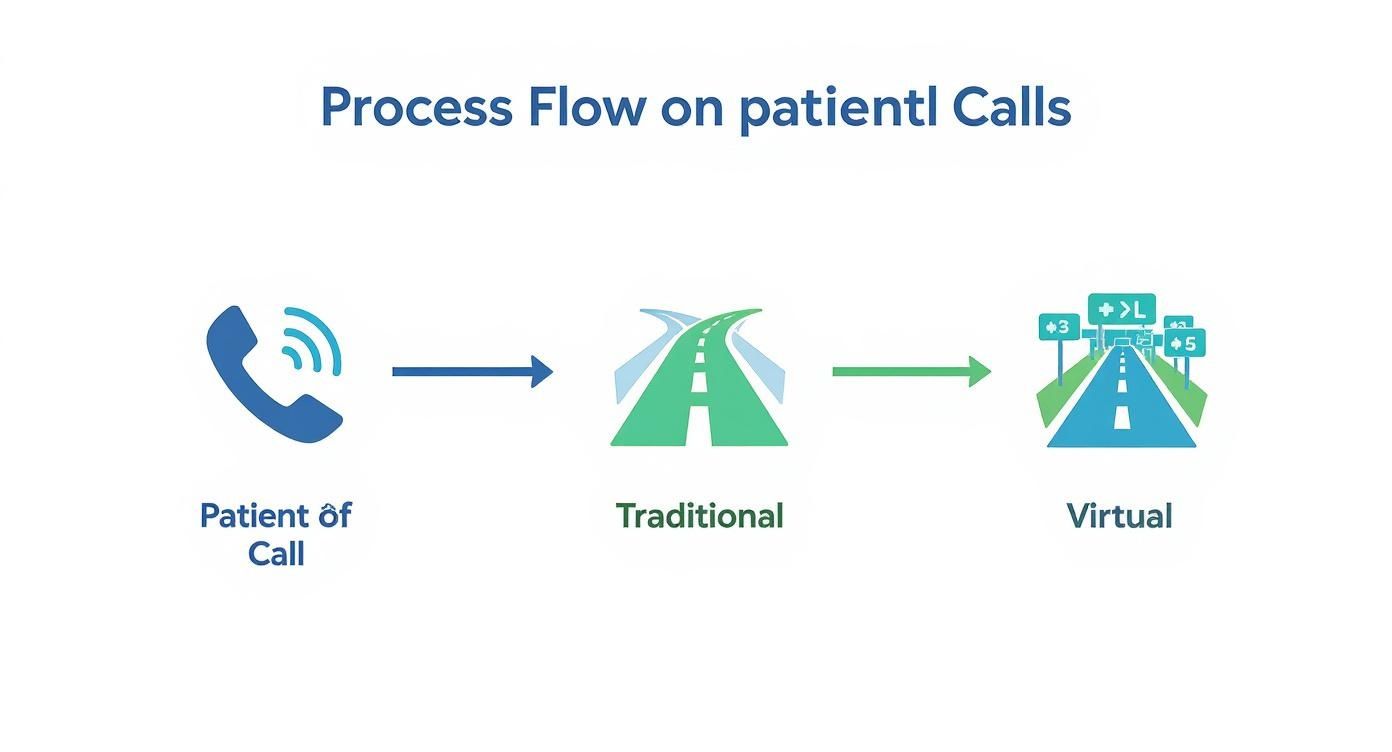
You can see how a single-lane, traditional approach gets overwhelmed fast. In contrast, a multi-channel virtual system handles the volume with ease, ensuring every single patient gets a prompt response.
Putting Administrative Duties on Autopilot
On the admin side, a virtual receptionist acts as a tireless assistant, taking over the high-volume, repetitive tasks that eat up your staff’s day. This is where you see immediate, measurable gains in efficiency.
Here’s what that looks like in practice:
- 24/7 Appointment Scheduling: Patients can book, change, or confirm appointments whenever it suits them—day or night—and it all syncs directly with your practice management system. This kills the game of phone tag and captures appointments you’d otherwise lose after hours. We go deeper on this in our guide to the ideal patient appointment scheduler.
- Real-Time Insurance Verification: The system can automatically check a patient’s insurance eligibility right when they book. This single step drastically cuts down on claim denials and the administrative nightmare of chasing down correct policy info later.
- Billing and Payment Questions: It can handle common questions about balances, walk patients through their statements, and even securely process payments over the phone. This takes a significant load off your billing department.
Automating these processes isn’t just about saving time. It creates a more consistent, accessible, and professional experience for your patients. And this is just the start—healthcare documentation automation is another huge opportunity for practices to boost efficiency and cut down on paperwork.
Leveling Up Your Clinical Support Workflows
A truly specialized virtual receptionist goes beyond administrative work and provides critical clinical support. It ensures patient needs are addressed accurately and routed to the right person, even when your office is dark.
Here’s how it works: A patient calls at 10 PM about a non-urgent prescription refill. Instead of their call going to a voicemail that sits unheard until morning, Marlie.ai securely verifies their identity, documents the request, and pushes a notification directly to the on-call physician’s dashboard. The whole thing is seamless, secure, and incredibly efficient.
This kind of intelligent support makes a real difference in a few key areas:
- Non-Urgent Patient Triage: Using predefined clinical protocols, the system can assess a caller’s needs. It knows the difference between a routine question and symptoms that require immediate attention, routing urgent calls to clinical staff without any delay.
- Prescription Refill Management: It manages the entire refill workflow—from capturing the patient’s initial request to verifying the details and sending it off to the pharmacy or physician for final approval.
- Automated Reminders: It sends out automated appointment reminders via call or text, which is proven to slash no-show rates. In fact, studies show automated reminders can cut no-shows by over 30%, directly protecting your practice’s bottom line.
This powerful mix of administrative automation and clinical support is why the healthcare virtual assistant market is exploding. It’s projected to leap from USD 1.4 billion in 2026 to over USD 19.2 billion by 2035. This isn’t just a trend; it’s a fundamental shift as practices recognize these tools are essential for better operations and happier patients.
By offloading these vital but time-consuming tasks, a virtual medical receptionist empowers your team to work at the top of their licenses, delivering better care and a better experience for everyone.
Ensuring HIPAA Compliance and Data Security
In healthcare, trust isn’t just a part of the patient relationship—it’s the entire foundation. When a patient shares their most sensitive information, they have a right to expect it will be protected with the absolute highest level of care. This is why choosing a virtual receptionist medical service isn’t like picking any other business tool; it’s a decision that hits right at the core of your practice’s integrity and legal standing.
A generic virtual receptionist might be great for a local plumber, but it’s a massive liability for a medical practice. The difference boils down to one critical framework: the Health Insurance Portability and Accountability Act (HIPAA). Any platform built for healthcare has to be architected from the ground up to safeguard protected health information (PHI) at every single touchpoint.
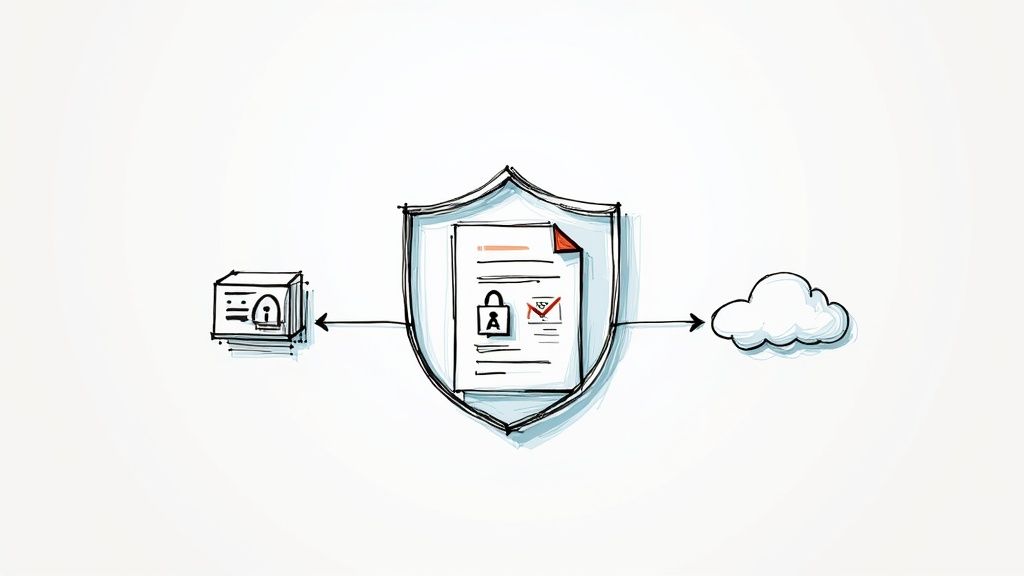
This isn’t just about a promise of privacy. It’s about having provable, hard-coded technical safeguards that are non-negotiable for any medical practice.
The BAA Is Your Non-Negotiable Agreement
Before you even glance at a feature list, there’s one document that matters more than any other: the Business Associate Agreement (BAA). A BAA is a legally binding contract that holds your virtual receptionist provider to the same strict HIPAA standards your own practice must follow.
If a vendor won’t sign a BAA, the conversation is over. It’s really that simple.
Without one, you are putting your practice, your patients, and your license at significant risk. This agreement is your official assurance that the vendor is a true partner in protecting patient data, not just another service provider.
Core Security Features Your Practice Needs
Beyond the BAA, a HIPAA-compliant virtual receptionist must have a specific set of security protocols baked into its DNA. These aren’t optional add-ons; they are fundamental requirements for handling PHI safely.
Your checklist should absolutely include:
- End-to-End Encryption: All communication—whether it’s a voice call, a text message, or data being pushed into your EMR—must be encrypted. This essentially scrambles the information, making it unreadable to anyone without authorized access.
- Secure Data Storage: Patient data can’t just sit on any old server. A compliant provider uses secure, access-controlled data centers with protocols built specifically for sensitive health information.
- Strict Access Controls: Not everyone at the vendor’s company should have eyes on patient data. Role-based access ensures that only authorized personnel can view PHI, and every single access is logged and auditable.
Any virtual receptionist in a medical setting has to live and breathe these data protection rules. For a deeper dive into the specifics, especially around digital communications, this complete security guide for HIPAA compliance for email provides some excellent context.
A compliant platform like Marlie.ai is engineered with these principles in mind. Every interaction, from a simple appointment reminder to a detailed intake form, is processed within a secure environment designed to meet and exceed HIPAA’s stringent requirements.
Think about it: when a patient’s call is recorded for quality assurance, the security measures have to be just as robust. Understanding the nuances of secure call recording and transcription is essential, as these records themselves become protected health information the second they’re created.
Ultimately, choosing a virtual receptionist medical service is a security decision first and an operational one second. By putting HIPAA compliance first and verifying these core security features, you can confidently adopt a powerful tool that helps your practice run better while upholding the sacred trust your patients place in you.
Measuring the ROI for Your Medical Practice
Bringing a virtual receptionist into your practice isn’t just an operational tweak—it’s a serious financial decision. So, how do you actually know if that investment is paying off? The secret is to stop focusing on flashy features and start looking at measurable results that directly fatten your bottom line.
To do this, you first need to get a clear picture of where you stand right now. This is your baseline. Once you know your starting point, you can track a few key numbers to see the tangible return on your investment. This isn’t about gut feelings; it’s about using hard data to prove this tool is driving real growth.
Key Metrics That Tell the Story
Your practice is a data goldmine. When you’re sizing up a virtual receptionist, zoom in on the numbers that reflect patient access, staff efficiency, and, of course, revenue. These metrics will paint a crystal-clear before-and-after picture of the system’s true impact.
Here are the most important KPIs to keep your eyes on:
- Call Abandonment Rate: This is the percentage of people who hang up before ever speaking to a human. A high number here is a flashing red light for lost opportunities and frustrated patients.
- After-Hours Appointments Booked: You need to track every single new patient appointment that gets scheduled when your office is closed. Each one is pure profit you would have otherwise missed.
- Staff Time Reallocated: Measure the hours your team gets back from not having to field routine calls. That time can be poured into higher-value work, like face-to-face patient care or chasing down complex insurance claims.
Think about this: a busy clinic was losing 20% of its calls during peak times. After bringing in an AI receptionist, their missed call rate plummeted to under 3%. Better yet, they booked 12 new patient appointments from evening calls in the very first month.
That’s the kind of immediate win that flips a potential expense into an undeniable revenue generator. You can play with the numbers for your own practice with our guide on how to calculate cost savings with an AI assistant.
Translating Metrics Into Dollars and Cents
Once you’re tracking these KPIs, you can start putting real dollar amounts next to them. This isn’t just about cost savings; it’s also about new revenue you’re bringing in, giving you a complete ROI picture.
To see how a virtual receptionist like Marlie impacts your practice’s finances, it’s crucial to track specific metrics both before and after you make the switch. Here’s a simple framework to help you measure what matters.
KPIs to Measure Virtual Receptionist Impact
| Metric | Before Implementation (Baseline) | After Implementation (Target Goal) | How to Measure |
|---|---|---|---|
| Call Abandonment Rate | e.g., 20% | e.g., <5% | Phone system analytics |
| New Appointments Booked After-Hours | e.g., 0 | e.g., 10+ per month | Scheduling software reports |
| Staff Hours on Routine Calls | e.g., 15 hours/week | e.g., 2 hours/week | Time tracking or staff survey |
| Patient No-Show Rate | e.g., 15% | e.g., <10% | EHR/PM system reports |
| Cost per Patient Acquisition | e.g., $150 | e.g., $120 | (Marketing Spend) / (New Patients) |
By setting a baseline for these key areas, you create a clear benchmark. After implementation, you can compare the new numbers to your original baseline to quantify the exact financial uplift and efficiency gains.
The global healthcare virtual assistant market was valued at USD 1.26 billion in 2024 and is projected to explode to USD 8.74 billion by 2031. This isn’t just hype; it’s driven by the undeniable financial and operational wins these systems deliver. You can learn more about this expanding market and its global impact.
To calculate your own return, focus on these three areas:
- Reduced Operational Costs: Compare the monthly cost of a virtual receptionist to the fully-loaded cost of a staff member (salary, benefits, PTO). The savings are immediate and often massive—sometimes as much as 60-70%.
- Increased Revenue from Captured Calls: Multiply the number of new appointments booked by your average revenue per visit. This is the direct income you gained by simply answering the phone.
- Lowered No-Show Rates: Automated reminders can slash no-shows by over 30%. Add up the value of those saved appointments, and you’ll see another direct boost to your revenue.
When you track these specific data points, you’re not just buying a service; you’re building a powerful business case. You can prove, with numbers, that a virtual receptionist medical solution is a critical tool for building a more efficient, profitable, and resilient practice.
How to Choose the Right Vendor for Your Practice
Picking a virtual receptionist for your practice is a much bigger decision than just comparing monthly price tags. The right choice becomes a seamless extension of your team. The wrong one? It can lead to frustrated patients and even legal headaches. This isn’t about finding the cheapest answering service; it’s about finding a technology partner who actually gets the unique demands of healthcare.
To make the right call, you need a clear framework. You have to look past the flashy features and dig into what really matters in a medical setting: rock-solid security, deep software integration, and the flexibility to mold itself to your clinic’s workflows.
HIPAA Compliance and Security Are Non-Negotiable
Before you even glance at a feature list, the first question has to be about HIPAA. A potential vendor can’t just say they’re HIPAA compliant; they must be willing to sign a Business Associate Agreement (BAA). This is a legally binding contract that holds them to the exact same data protection standards you follow. If a vendor hesitates on signing a BAA, that’s your cue to walk away. No exceptions.
Beyond the BAA, you need to confirm they have serious security protocols in place. This includes things like:
- End-to-end encryption for every single communication, from calls to messages.
- Secure data storage in environments built specifically for protected health information (PHI).
- Strict access controls to make sure only authorized people can ever see sensitive patient data.
These aren’t nice-to-haves; they’re the absolute price of admission for any tech partner in medicine. Your patients’ trust is your most valuable asset, and it must be protected at all costs.
Seamless Integration with Your EMR and PMS
A virtual receptionist that doesn’t talk to your other systems is just a fancy answering machine. The real value gets unlocked when it integrates seamlessly with your Electronic Medical Record (EMR) or Practice Management System (PMS). This is the key to genuine automation and efficiency.
Without deep EMR integration, your virtual receptionist can take a message, but it can’t take action. True integration allows it to book appointments directly into your calendar, update patient records with call notes, and streamline workflows without any manual data entry from your staff.
When you’re vetting vendors, ask for a concrete list of the EMRs they integrate with. A top-tier provider like Marlie.ai is built from the ground up to sync with leading healthcare platforms, ensuring patient information flows accurately and securely. This connection is what turns a simple call-handling service into a powerful tool for managing your practice.
Customization for Your Unique Clinical Workflows
No two medical practices are exactly alike. Your virtual receptionist has to be flexible enough to adapt to your specific ways of doing things, from the words in your call scripts to your patient triage procedures. A one-size-fits-all approach just doesn’t cut it in a clinical setting where precision is everything.
Look for a vendor that gives you deep control. You should be able to define:
- Custom call scripts that match your practice’s unique tone and terminology.
- Specific call routing protocols for different kinds of calls (e.g., billing questions vs. clinical concerns).
- Patient triage logic that can tell the difference between a routine request and something medically urgent.
This level of control ensures the virtual receptionist feels like a real part of your team, giving every patient a consistent and professional experience. For more ideas on this, our comparison of top virtual receptionist companies can help you see what different providers bring to the table. Picking the right virtual receptionist medical vendor is a strategic move—focus on security, integration, and customization to find a partner that will truly help your practice thrive.
Integrating a Virtual Receptionist Into Your Workflow
Bringing a virtual receptionist on board should feel like a well-planned upgrade, not an overnight disruption. A smooth transition really hinges on having a clear, step-by-step plan that gets both your technology and, more importantly, your team ready for the change.
Success isn’t just about flipping a switch; it’s about thoughtfully weaving this new tool into the fabric of your daily operations. The whole point is to make sure the system supports your staff, rather than just adding another task to their plate. When done right, you get a seamless launch that elevates your patient care from day one.
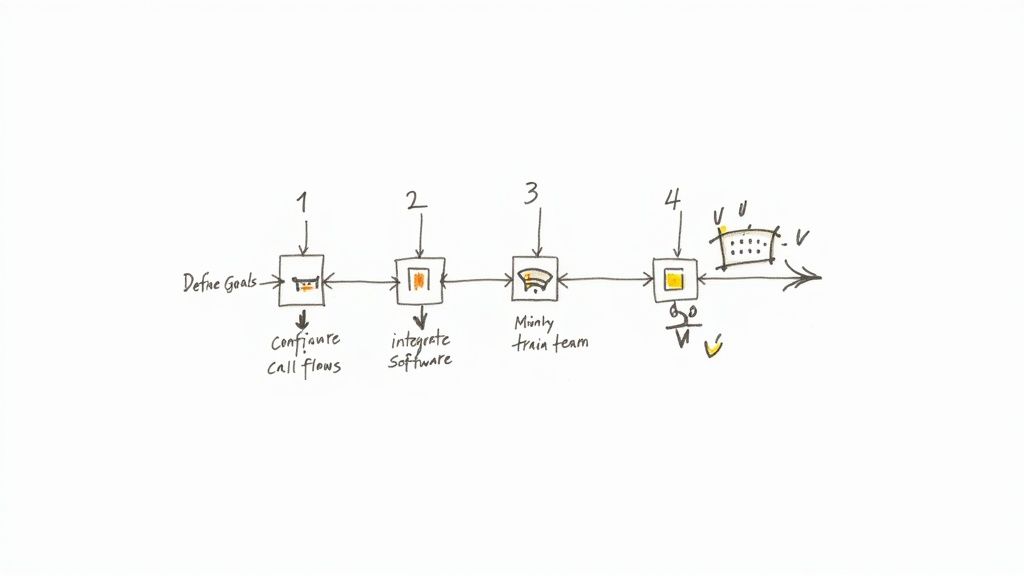
A Five-Step Implementation Plan
A structured approach takes the mystery out of the process and sets you up for a win. Walking through these steps helps guarantee that your virtual receptionist medical solution is a perfect fit for your practice’s unique rhythm.
Define Your Primary Goals: First things first, what problem are you actually trying to solve? Are you looking to slash the number of missed calls? Maybe you want to capture those after-hours appointment requests or simply free up your staff from the constant back-and-forth of scheduling. Setting clear, measurable goals helps you dial in the system to deliver the results you care about most.
Configure Patient Call Flows: This is where you get to be the architect. Map out exactly how you want different calls handled. For instance, a new patient calling for information should probably follow a different path than an existing patient needing a prescription refill. This is where you customize the logic so it lines up perfectly with your clinical and administrative protocols.
Integrate with Your Core Software: The real magic happens when your virtual receptionist can talk to your EMR and Practice Management System. This is a non-negotiable step. It’s what automates tasks like booking appointments directly into the calendar and updating patient records, getting rid of all that tedious manual data entry for your team.
Train Your Team for the Transition: Prepare your staff by showing them how this new system is a tool to make their lives easier, not replace them. Walk them through how it handles the repetitive stuff, which frees them up to focus on higher-value, in-person patient interactions. A team that’s in the loop is absolutely essential for a smooth rollout.
Launch and Monitor Performance: Once you’re live, keep a close eye on your key metrics. Are appointment bookings up? Is call volume being handled efficiently? What’s the patient feedback look like? Use this data to make small tweaks and fine-tune the workflow over time.
The key to getting your staff on board is crystal-clear communication. Make it obvious that the virtual receptionist is there to handle the endless, repetitive calls, which frees them up for the more complex patient needs that require a human touch.
By framing the technology as a helpful assistant, you build a collaborative environment where your team and your new system work together in harmony. This approach turns what could be a technical headache into a strategic upgrade for your entire practice.
Your Questions, Answered
Even when you see the potential, it’s natural to have questions about how a virtual receptionist would actually work in your practice. Let’s tackle some of the most common ones head-on.
How Much Does a Virtual Receptionist Cost?
This is usually the first question, and the answer is one of the biggest benefits. A virtual receptionist is dramatically less expensive than hiring a full-time, in-house employee. You’re not covering a salary, benefits, insurance, or paid time off—just a predictable monthly subscription.
Most practices see savings of 60-70% while getting 24/7 coverage, something that would require at least three full-time hires to accomplish. The cost is based on the services you need, not a fixed hourly rate. This makes it a solution that can grow with you, whether you’re a solo practitioner or a multi-location clinic. Platforms like Marlie.ai have tiered plans, so you only pay for what your practice really needs.
Will Patients Be Comfortable Talking to an AI?
It’s a fair concern. But modern AI is designed for natural, conversational interactions, not the robotic phone trees of the past. For routine tasks like scheduling an appointment or asking for directions, most patients actually prefer the instant, 24/7 convenience over waiting on hold.
The key is a hybrid approach. The AI handles the high-volume, repetitive tasks with speed and precision. But it must always offer a simple, seamless way for patients to reach a human for sensitive or complex clinical issues. This combination is the sweet spot for maximizing efficiency and patient satisfaction.
This balanced system gives patients the best of both worlds: immediate help for simple requests and a human touch when it matters most.
What Is the Technical Setup Process Like?
The whole process is designed to be simple for your practice. The provider does the heavy lifting. Your main job is just to forward your main practice phone line to the number they give you. It’s that straightforward.
To unlock the full power, the vendor will guide you through a secure integration with your Electronic Health Record (EHR) and practice management software, usually through an API. A quality partner will have a dedicated onboarding team to manage the entire setup, ensuring everything launches smoothly without disrupting your daily workflow. The goal is to get you up and running fast.
Ready to see how an AI-powered assistant can transform your practice? Discover how Marlie Ai provides 24/7, HIPAA-compliant support that cuts costs, captures every opportunity, and frees your staff to focus on patient care. Learn more at Marlie.ai.
