

Think of an automated calling system as a tireless digital assistant, one that can handle thousands of phone conversations at once. At its core, this is software that automatically dials numbers to deliver messages or connect callers to live agents, moving your team from tedious manual dialing to intelligent, efficient outreach.
What Are Automated Calling Systems?
An automated calling system is a piece of tech that manages a high volume of calls—both inbound and outbound—without a human needing to be involved in every single interaction. Imagine your team trying to manually dial hundreds of customers to remind them about their appointments. That’s an entire day’s work, easily. An automated system knocks that out in minutes, freeing up your staff for issues that actually require their expertise.
These systems are the engine behind a lot of everyday interactions, whether it's your doctor's office confirming a visit or a local campaign sharing a message. They're built to scale up communication, ensuring every call is handled consistently and efficiently in a way a human team just can't match. The whole point is to automate the repetitive stuff, make your operations smoother, and give customers timely information when they need it.
The Technologies Driving Automation
Under the hood, a few key technologies work together to make this all happen. Each has a different job, but they all share the goal of creating smart, automated communication. Once you understand the pieces, you can start to see the potential.
- Interactive Voice Response (IVR): This is the classic "press 1 for sales, press 2 for support" menu. It acts like a digital receptionist, sorting callers and guiding them to the right department or information using their phone's keypad.
- Predictive Dialers: Built for outbound call centers, this technology is a powerhouse. It dials multiple numbers at the same time and only connects a call to a live agent when a real person answers, massively boosting the amount of time agents spend actually talking to people.
- AI Voicebots: This is where things get really interesting. AI voicebots use natural language processing to understand what someone is saying and hold a human-like conversation. They can resolve issues on their own, no pre-set menu required.
Let's quickly compare these technologies to see where each one shines.
Quick Comparison of Automated Calling Technologies
This table breaks down the three main types of automated calling systems, highlighting their best-fit use case and how they interact with callers.
| System Type | Primary Use Case | Interaction Style |
|---|---|---|
| Interactive Voice Response (IVR) | Routing inbound calls to the correct department or self-service option. | Keypad-based (DTMF tones). The caller presses buttons to navigate a menu. |
| Predictive Dialer | High-volume outbound campaigns like telemarketing or lead generation. | Connects a human caller to a live agent, filtering out voicemails and busy signals. |
| AI Voice Assistant | Handling complex inbound or outbound conversations and resolving issues. | Conversational. The caller speaks naturally, and the AI understands and responds. |
As you can see, the right tool really depends on the job. IVRs are great for simple sorting, predictive dialers maximize agent productivity, and AI voice assistants offer a truly interactive, conversational experience.
Why Automation Is No Longer Optional
The move toward automation isn't just a trend; it's a fundamental shift in how business gets done. Consider this: the global call center AI market was valued at $1,998.7 million in 2024 and is expected to explode to $7,084.7 million by 2030. That kind of growth is driven by a clear need for companies to slash operational costs—by as much as 60% in some cases—while simultaneously boosting efficiency.
An automated calling system doesn't replace your team; it empowers them. By handling the routine, high-volume tasks, it allows your skilled agents to focus on the complex, high-value conversations that truly drive your business forward.
This strategic shift is a game-changer. Instead of an agent spending their day manually confirming appointments, an automated system handles it. That frees the agent up to help a customer with a critical, revenue-generating issue.
The system also plays a crucial role in getting incoming calls to the right place. By using smart logic, these platforms ensure customers are connected to the best person on the first try—a core principle we cover in our guide to call routing. This intelligent direction cuts down on customer frustration and boosts first-call resolution, turning a simple phone call into a positive brand experience.
A Look at the Different Types of Calling Systems
Not all automated calling systems are the same. Think of them like different tools in a toolbox—each one is built for a specific job. Understanding what makes them tick is the first step to picking the right one for your business. We'll walk through the three main approaches, starting with the simple menu-based systems and working our way up to the seriously smart conversational platforms.
This diagram gives you a bird's-eye view of the main categories and how they fit into the bigger picture.
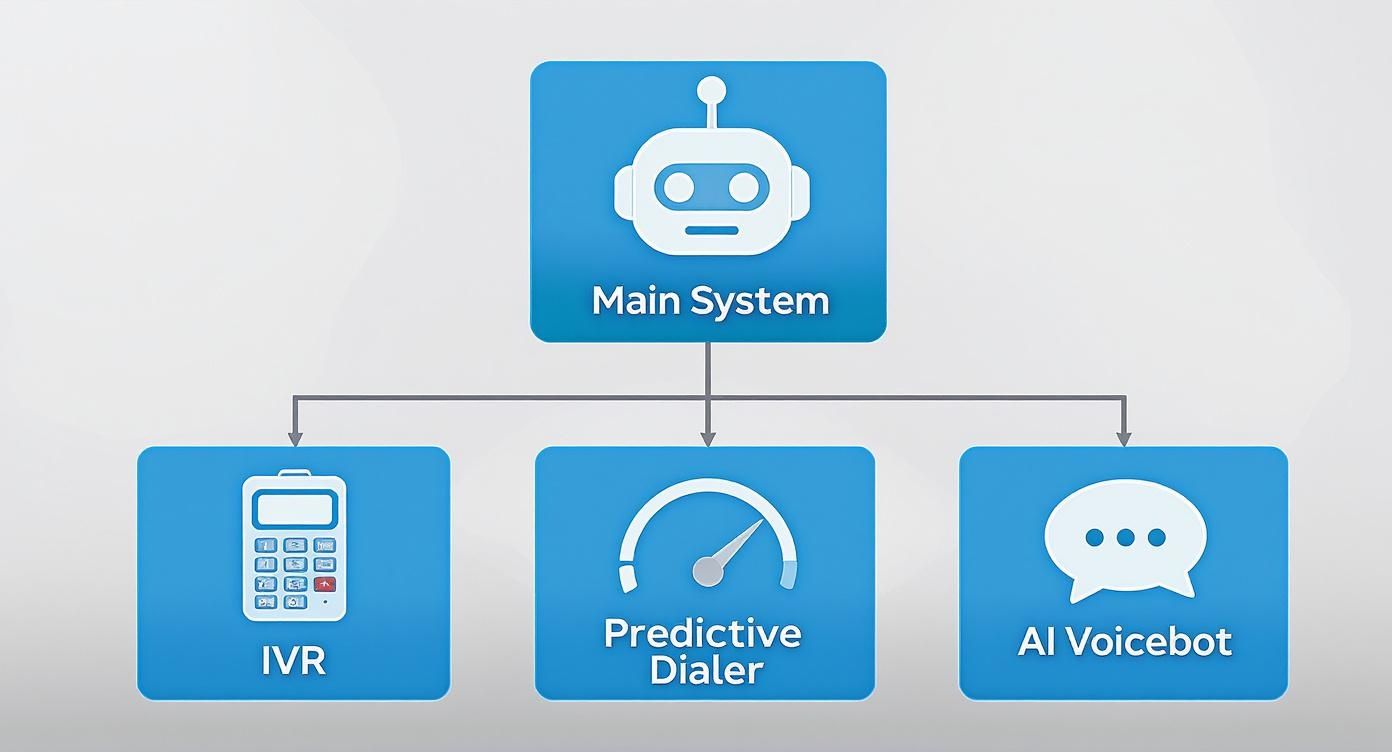
As you can see, while they all fall under the "automation" umbrella, the way they interact is worlds apart, ranging from simple button pushes to full-blown natural conversations.
Interactive Voice Response (IVR): The Digital Phone Tree
You've definitely run into an Interactive Voice Response, or IVR, system before. It's the classic "Press 1 for Sales, Press 2 for Support" you hear when calling a big company. Think of it as a digital phone tree or a building's directory.
Its main job is to sort and route callers who are coming in. By pressing buttons on their keypad (using what's called DTMF tones), callers can navigate a preset menu to land in the right department or get basic info like their account balance without ever talking to a human.
This technology is an absolute workhorse for any business dealing with tons of calls. It handles the simple stuff 24/7, freeing up your team for more complex issues. To get a deeper understanding of how this foundational tech works, check out our guide explaining what is IVR and where it’s most useful.
Predictive Dialers: The Efficiency Engine
While IVRs are all about managing incoming calls, predictive dialers are built for one thing: outbound efficiency. Picture a sales team that needs to make hundreds of calls every single day. So much of their time gets eaten up by numbers that don't answer, go straight to voicemail, or are busy. It's a huge time-sink.
A predictive dialer completely changes that game by acting like a smart, high-speed dialing machine. It uses an algorithm to dial multiple numbers at once, predicting the exact moment an agent is about to finish their current call. As soon as a live person picks up, the system instantly connects them to a free agent.
The real magic of a predictive dialer is how it maximizes an agent's "talk time." By filtering out all the dead-end calls, it makes sure your team spends their valuable hours having actual conversations. This can boost productivity by a staggering 200-300%.
That makes it a must-have for anyone in telemarketing, lead generation, or any big outbound campaign where the goal is to connect with as many real people as possible, as fast as possible.
AI Voicebots: The Intelligent Concierge
Finally, we get to the most advanced player in the game: the AI voicebot. If an IVR is the building directory, an AI voicebot is the building's concierge. Instead of forcing people down a rigid, one-size-fits-all menu, it has a natural, human-like conversation with them.
AI voicebots use Natural Language Processing (NLP) to actually understand what a caller is saying and, more importantly, what they mean. This allows them to answer complex questions, book appointments, take payments, and even handle entire customer service issues from start to finish.
This level of automation creates a much, much better customer experience. Callers can just say what they need in their own words, and the AI takes care of the rest. And as technology keeps pushing forward, so do the ways we communicate. For a glimpse into what's next, you can explore the idea of a voice call app for work without phone numbers to see how new platforms are shaking up business interactions.
Core Features and Business Benefits
Okay, so we've covered the different types of automated callers. But knowing what they are is one thing; understanding what they can actually do for your business is where the real value lies.
Modern systems are loaded with features that directly boost your efficiency, make customers happier, and fatten up your bottom line. These aren't just flashy add-ons; they're the engine components that make the whole operation purr.
Think of these features as a specialized toolkit. Each tool serves a purpose, but when you use them together, they build something massive: a streamlined communication strategy that works around the clock, so you don’t have to.
Essential System Functionalities
At their core, these systems are built to handle conversations at a scale no human team could ever manage. They pull this off with a mix of smart dialing, intelligent routing, and smooth integration with the software you already depend on.
These are the fundamental features you should expect:
- Intelligent Call Routing: This is the brains of the operation. It automatically sends callers to the right person or department based on why they're calling. It kills that awful experience of being bounced from one agent to another and dramatically improves the chances of solving a problem on the first try.
- Automated Dialing Modes: Different campaigns need different approaches. A predictive dialer calls multiple numbers at once and only connects your agent when a real person answers—pure efficiency. A power dialer, on the other hand, dials one number right after the other for a single agent, cutting out all the wasted time of manual dialing.
- Text-to-Speech (TTS): This cool piece of tech turns written words into natural-sounding audio. It lets you create and update automated messages instantly, which is perfect for appointment reminders, order status updates, or any other dynamic notification.
- CRM Integration: This is a non-negotiable. When your calling system talks to your Customer Relationship Management (CRM) software, it gives your team a 360-degree view of every customer. An incoming call can instantly pop up the caller's entire history, letting your agent provide service that feels personal and informed.
These pieces work together to transform chaotic call management into a finely tuned machine.
Transforming Features into Business Growth
The magic happens when you connect these technical features to real-world business results. It’s about drawing a straight line from a function like "CRM integration" to an outcome like "happier, more loyal customers."
For example, intelligent call routing isn't just about shuffling calls around. It's a direct counterattack on customer frustration. When people get their problems solved on the first call, their opinion of your business skyrockets. In fact, studies show a staggering 67% of customer churn is preventable if you just solve their issue the first time they reach out.
The point of automation isn't to get rid of the human touch. It's to free up your team to use that touch where it counts the most—on the complex, high-value conversations that build relationships and actually make you money.
Think about it: automated dialing can increase an agent's active talk time by up to 300%. That's more time spent speaking with actual prospects and less time listening to a phone ring. The direct result is more sales and a much better return on your outbound efforts.
Finally, by syncing your calling system with your other business tools, you create a single source of truth. This eliminates confusion and gives your team the full picture every time they pick up the phone. It's this unified, context-aware approach that allows an advanced AI phone answering system to deliver an experience far beyond what a basic IVR ever could. That's how you really fuel growth.
How To Implement An Automated Calling System
Bringing new technology into your business can feel like a massive undertaking, but it doesn't have to be. The trick is breaking it down into small, logical steps. Setting up an automated calling system isn't about flipping a switch; it's about carefully building a smarter communication strategy. Having a clear roadmap from the start makes the whole thing run smoothly and keeps the headaches at bay.
The work begins long before you even look at a single provider. It all starts with one simple question: What problem, exactly, are you trying to fix? Getting crystal clear on your goals is the foundation for everything that follows.
Step 1: Define Your Core Objectives
Before you get lost in a sea of features and pricing plans, you need to nail down your "why." Are you trying to slash the number of missed appointments? Or maybe you want to qualify sales leads faster? Perhaps you just need a way to offer 24/7 support for basic questions without burning out your staff.
Take a minute and write down your top three goals. Be specific.
- Goal 1: Cut down on appointment no-shows by 30% with automated reminders.
- Goal 2: Free up 10 hours of staff time each week by letting a bot handle routine FAQs.
- Goal 3: Drastically improve lead response time by making sure every new inquiry gets an instant answer.
When you have measurable targets like these, every decision you make—from picking the right system to checking your ROI later—becomes much, much easier.
Step 2: Choose The Right System Type
Okay, with your goals locked in, it's time to pick the right tool for the job. The big choice here usually boils down to an on-premise system versus one that's cloud-based.
On-premise solutions mean you're buying and maintaining all the hardware yourself. That’s a hefty upfront investment and requires dedicated IT folks to keep it running.
Cloud-based systems, on the other hand, are hosted by the provider and you just access them over the internet. You pay a subscription, and that's it. This route gets rid of the need for expensive hardware and gives you a ton more flexibility to grow. The market is definitely voting with its feet here; the cloud business phone system market is expected to jump from $15.39 billion in 2024 to a whopping $29.27 billion by 2029. That kind of growth shows just how many businesses are opting for scalable solutions without the massive capital outlay.
For most small and mid-sized businesses, a cloud-based automated calling system is the sweet spot—it delivers the best mix of power, affordability, and simplicity. If you're still weighing the pros and cons, our small business phone system comparison can help you sort things out.
Step 3: Design An Effective Call Flow
This is where you put yourself in your customer’s shoes and map out their journey. A clunky, confusing call flow is a surefire way to get people frustrated and hanging up. The secret is to keep it simple, intuitive, and laser-focused on getting the caller's problem solved fast.
Think like your customer. Your goal isn't to build a complicated phone maze. It's to create the fastest, straightest line from their problem to a solution—whether that's an answer from the AI or a quick handoff to a person.
Start by scripting a warm, clear greeting and then lay out the main options. If you're using an AI voicebot, this means designing conversational paths that guess what people are going to ask and guide them naturally. And always, always include an easy escape hatch for someone to reach a human, like pressing "0" or just saying, "I need to talk to someone."
Step 4: Integrate And Train
The last pieces of the puzzle are integration and training. You’ll want to connect your new calling system with the software you already use, especially your CRM. When your systems talk to each other, every call has context, which leads to a much more personal and effective conversation.
Finally, get your team up to speed. Even with great automation, your people are still the stars of the show. Make sure they know how the new system works, how to gracefully handle calls transferred from the AI, and where they can find call logs and recordings. A team that's in the loop is absolutely essential to getting the most out of your new setup.
Real-World Use Cases Across Industries

The true power of any technology becomes clear when you see it solving real problems for actual businesses. Theory is one thing, but tangible results are what really matter. Across a whole range of service-based industries, automated calling is quietly changing how work gets done, one answered call at a time.
Think about a stranded motorist needing a tow or a patient trying to book a check-up. Automation ensures no call goes unanswered. It acts like a digital first responder, gathering the critical details and moving things forward, even when the business owner is on another job or the office is closed for the night. This isn't just about picking up the phone; it's about capturing every single opportunity, 24/7.
For businesses that want to get smarter about their customer outreach, these systems are often a key part of their digital marketing automation tools. This helps create a smooth journey from the moment someone first reaches out to the final sale, all handled with incredible efficiency.
Emergency and On-Demand Services
Take the high-stakes world of emergency services, like locksmiths and towing companies. When a customer is locked out of their car or stuck on the highway, every single second counts. They aren't going to leave a voicemail and wait around; they’ll just call the next company on the list.
An automated calling system is the perfect dispatcher for these moments.
- Locksmiths: An AI can answer the call instantly, ask for the car's year, make, and model, and get the caller's location. That info is then immediately sent to the nearest technician, turning what would have been a missed call into a dispatched job in under a minute.
- Towing Companies: In the same way, an AI can collect all the key details—the vehicle type, where it is, and where it needs to go—and give the caller a solid ETA. This not only secures the business but also eases the caller's stress with immediate, useful information.
In both situations, the automated system makes sure that every urgent call is handled with speed and professionalism, even after hours or during a rush. The business owner gets the job, and the customer gets the help they desperately need without any delay.
Appointment-Based Businesses
For industries that live and die by their appointments—think HVAC services, clinics, and pharmacies—the phone is a constant source of administrative headaches. Scheduling, rescheduling, and sending out reminders can eat up a huge chunk of the workday, pulling staff away from more important tasks.
This is where automated calling systems really shine, by stepping in to manage the entire appointment lifecycle.
Medical and dental offices, for instance, have a critical need for clear patient communication. An AI can handle new appointment scheduling, send out automated confirmation calls, and even process refill requests, which massively lightens the load on the front desk. This frees up the team to focus on the patients standing right in front of them. If you're curious about this specific use case, our article on the benefits of a dental answering service goes into much more detail.
Automation in appointment-based businesses isn't about replacing people. It's about taking over the high-volume, repetitive tasks so your team can provide a higher level of care and attention to the clients and patients in the office.
Here’s a look at how it plays out:
- HVAC Services: An AI assistant books routine maintenance by offering available time slots and putting the appointment straight onto the company calendar.
- Medical Clinics: These systems can send out automated reminder calls before an appointment, which drastically cuts down on no-shows—a huge source of lost revenue.
- Pharmacies: Patients can call in and have an AI process their prescription refill requests without ever needing to pull a busy pharmacist or technician away from their work.
Hospitality and Customer Feedback
In the hospitality industry, the guest experience is everything. Hotels can use automated calling systems to make their operations run smoother and to gather priceless feedback.
For example, a system can automatically call a guest's room shortly after they check in just to ask if everything is to their liking. This simple, proactive touch makes guests feel looked after and gives the hotel a chance to fix any issues right away.
Then, after check-out, the system can place a follow-up call to thank the guest for their stay and ask them to complete a quick satisfaction survey. This provides the hotel with a constant stream of feedback they can use to make their service even better.
You Can’t Ignore the Rules of the Road
Deploying an automated calling system gives you incredible reach, but that power comes with serious responsibilities. If you fail to navigate the legal landscape or avoid common user experience blunders, you can quickly turn a powerful tool into a legal nightmare and a brand-damaging machine. Getting the rules right isn't just about avoiding fines—it's about building trust.
Think of compliance as the brakes and seatbelts on a sports car. You wouldn't floor it without knowing you can stop safely, and you shouldn't launch a calling campaign without understanding the regulations that protect consumers. These rules exist to prevent people from getting spammed with invasive calls, and respecting them is just good, ethical business.
Your Key Legal Obligations
In the United States, the big one is the Telephone Consumer Protection Act (TCPA). This law lays down strict guidelines on how businesses can use automated systems to contact people, especially on their cell phones. Ignoring the TCPA is a fast track to trouble, with fines running up to $1,500 per violation. That can add up terrifyingly fast in a high-volume campaign.
Here are the non-negotiables you have to get right:
- Get Explicit Consent: You must have clear, unambiguous permission from someone before you hit them with an automated dialer or a pre-recorded message. This is absolutely critical for marketing calls to mobile numbers.
- Check the Do Not Call Registry: Before any outbound telemarketing, you have to scrub your contact list against the National Do Not Call (DNC) Registry. If someone's on that list, you can't call them. Period.
- Offer a Clear Way Out: Every automated message has to provide a simple, obvious way for the person to opt out of future calls. And you have to honor that request immediately.
The sheer scale of call center operations makes this so important. Nearly 3 million Americans work in call centers, handling millions of calls every month. As the industry barrels towards a projected $500.1 billion by 2030, you can bet that regulatory scrutiny is only going to get tighter. You can dig into more call center industry insights on cmswire.com.
Don’t Let Your System Annoy Your Customers
Beyond the legal stuff, you have to avoid creating a system that just plain frustrates people. A clunky, poorly designed automated system can do way more harm than good, driving customers away instead of helping them out. The goal is efficiency that feels genuinely helpful, not robotic and cold.
A great automated system feels like a helpful concierge, guiding you smoothly to what you need. A bad one feels like a labyrinth with no exit, trapping you in a loop of frustration until you hang up.
Here are the common mistakes to steer clear of:
- Overly Complicated Menus: Please, don't greet callers with a novel-length list of options. Keep your main menu to three or four clear, distinct choices. Any more than that, and you're just causing confusion and immediate frustration.
- The Inescapable AI Loop: Always, always provide an easy "escape hatch" to a human. Simple commands like "speak to an agent" or pressing "0" should get them to a person right away. Trapping a caller in a conversation with a bot is a guaranteed way to lose them for good.
- Unnatural, Robotic Voices: Modern text-to-speech has come a long, long way. Invest in a system with a high-quality, natural-sounding voice. A choppy, robotic tone is an instant turn-off that makes your brand feel cheap and dated.
Got Questions? We've Got Answers.
Even when the tech makes sense on paper, it's the practical questions that pop up when you're thinking about bringing an automated calling system into your business. Let's tackle the big three that business owners always ask: cost, integration, and what this all means for your human team.
Getting straight answers here is what separates a cool idea from a real, workable solution for your company.
How Much Do Automated Calling Systems Actually Cost?
There's no single price tag, and that's a good thing. The cost is flexible, usually based on how you plan to use it. Knowing the common pricing models helps you figure out what you'll spend and pick a plan that fits your call volume like a glove.
- Pay-as-you-go: This is your classic per-minute pricing. You’re billed for each minute the system is on a call, with rates sometimes as low as $0.25 per minute. It’s a great fit if your call volume goes up and down.
- Monthly Subscription: Many providers offer a flat monthly or annual fee that covers a certain number of minutes or calls. This makes your costs predictable, which is perfect for businesses with a steady, consistent flow of calls.
- Per-Seat Fee: Some platforms, especially the ones baked into bigger contact center software, charge based on how many of your human agents will be using the system.
Here's a pro tip: look past the sticker price. A system that stops you from missing calls and books just one extra high-value job a week can pay for itself almost instantly. That's a serious return on investment.
Can These Systems Talk to My Other Software?
Yes, absolutely. Modern automated callers are designed to be team players, not solo acts. The magic behind this is something called an API (Application Programming Interface), which is basically a universal translator that lets different software programs talk to each other.
This connection is crucial. For instance, when you hook your automated caller up to your CRM (Customer Relationship Management) software, it can instantly pull up a customer's entire history the moment they call. This makes for a much smoother, more personal conversation, whether it’s an AI or a human agent on the line. Most of the big players offer ready-made integrations with popular tools like Salesforce, HubSpot, and all sorts of scheduling apps.
Is an Automated System Going to Replace My People?
I get this question all the time, and the answer is a hard no. Think of an automated calling system as a force multiplier for your team, not a replacement. Its real job is to take on the mountain of simple, repetitive tasks that tie up your best people.
Put it this way: an AI can handle routine questions like "what are your hours?" or "can you confirm my appointment?" without breaking a sweat. By automating these calls—which can make up 60-80% of all inbound calls—you free up your human experts.
Now they can focus their full energy on the complex customer problems, the high-intent sales calls, and the kind of relationship-building conversations that actually grow your business and create loyal customers. The system acts as a tireless front-line filter, making sure your most valuable people are always working on your most valuable calls.
Ready to see how an AI assistant can capture every opportunity for your business? Marlie Ai answers 100% of your calls, books jobs 24/7, and saves businesses thousands compared to traditional answering services. Learn more at Marlie.ai.
